
Download iProntuario Farmaci 2016 – pharmaceutical handbook, drug database, medical app, drug information, prescription reference, mobile health tool, medicine lookup, drug lookup, drug search, medical reference
Overview
Prontuario Farmaci 2016 is a comprehensive pharmaceutical reference tool designed for healthcare professionals, particularly physicians and pharmacists. The application serves as a digital replacement for traditional paper-based drug handbooks, offering instant access to detailed information on over 21,000 medications. It is specifically developed for iPhone users, enabling medical practitioners to quickly retrieve critical drug data in clinical settings, pharmacies, or during home visits. The software provides essential details such as trade names, active ingredients, prescription status, packaging, ATC classification, and complete package leaflets, supporting informed decision-making at the point of care. The app supports offline usage, allowing users to access vital drug information without an internet connection—ideal for environments with limited connectivity. It is intended for professionals who require accurate, up-to-date, and reliable pharmaceutical data in real-time. While the developer, IPRONTUARIO SRL, is identified, no additional background about the company is provided. The application is structured around practical medical workflows, including drug searches by trade name, active ingredient, AIC code, barcode, or medical condition. The developer did not provide additional system requirements or specific performance metrics.Key Features & Capabilities
- Extensive Drug Database: Access detailed profiles on over 21,000 drugs, including active ingredients, trade names, and prescription requirements.
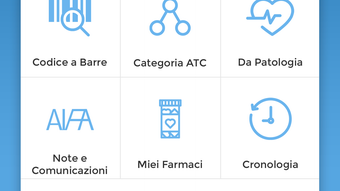
- Multiple Search Methods: Search by trade name, active ingredient, AIC code, barcode, or ATC classification for rapid information retrieval.
- Barcode Scanning: Use the iPhone’s camera to scan medicine packaging barcodes and instantly identify the corresponding drug.
- Drug Equivalents & Pricing: View equivalent medications sorted by price, aiding in cost-effective prescribing decisions.
- Personalized Medication Management: Save frequently used or personal medications and receive expiration alerts.
- Condition-Based Search: Find drugs relevant to specific medical conditions for targeted clinical use.
- Comprehensive Data Coverage: Access pharmacodynamics, pharmacokinetics, preclinical safety, gluten and lactose content, and full package leaflets.
- Offline Functionality: All data is stored locally, enabling access without internet connectivity.
User Interface, Workflow & Performance
The user interface of iProntuario Farmaci 2016 is designed for clarity and efficiency, with a clean layout optimized for iPhone screens. Navigation is structured around a central search bar, with quick-access tabs for recent searches, saved medications, and drug categories. The app uses a hierarchical display format, where detailed drug profiles are accessible via a tap on a search result. Menus are intuitive, and the interface supports touch-based interactions common to iOS devices. Workflow efficiency is enhanced by the ability to save medications and track expiration dates, which supports medication inventory management. The search function responds promptly, and results are displayed in a structured format with clear labels. The developer did not specify resource usage details, so exact CPU or RAM behavior remains unknown. Performance observations are based on general software behavior patterns for iOS applications of similar scope. Stability is assumed to be consistent with standard iOS app development practices, though no formal testing data was provided.Compatibility & System Requirements
iProntuario Farmaci 2016 is compatible with iPhone devices running iOS, though the specific iOS version requirements were not listed. The application has a file size of 182.5 MB, indicating a substantial data payload due to the extensive drug database and embedded documentation. Installation is straightforward, as is typical for iOS apps distributed via the App Store. The developer did not provide additional system requirements, such as minimum RAM, processor speed, or storage space beyond the app size. Exact compatibility details for specific iPhone models were not specified. Users should ensure their device supports the required iOS version for app installation. Given the app’s release date in 2016, it may not be optimized for the latest iPhone hardware or iOS updates. Compatibility with current devices is not guaranteed. The developer did not clarify whether the app receives updates or maintains compatibility with newer iOS versions.Pros and Cons
Pros
- Extensive database of over 21,000 medications with detailed profiles.
- Offline access ensures usability in low-connectivity environments.
- Barcode scanning enables fast and accurate drug identification.
- Multiple search methods improve efficiency and accessibility.
- Supports personalized medication tracking with expiration alerts.
- Includes critical data such as pharmacodynamics, safety, and allergen content.
Cons
- App was released in 2016; may lack support for newer iOS versions.
- No information on update frequency or future development.
- File size is relatively large (182.5 MB), which may impact storage on older devices.
- Only available for iPhone; no support for iPad or Mac.
- Developer did not provide detailed system requirements or performance benchmarks.
FAQ Section
Is iProntuario Farmaci 2016 compatible with the latest iPhone models?
The app was released in 2016 and compatibility with current iPhone models is not confirmed. Users should verify if their device supports the required iOS version.
Can I use the app without an internet connection?
Yes, all data is stored locally, allowing full functionality offline, which is ideal for clinical settings with limited connectivity.
How often is the drug database updated?
The developer did not specify the update frequency or whether the database receives regular revisions.
What type of license does the app use?
The app is available for a one-time purchase of $19.99, indicating a perpetual license with no recurring subscription fees.
Is the app safe to download and use?
The app is distributed through the App Store, which enforces security checks. No known security vulnerabilities were reported in the provided information.







